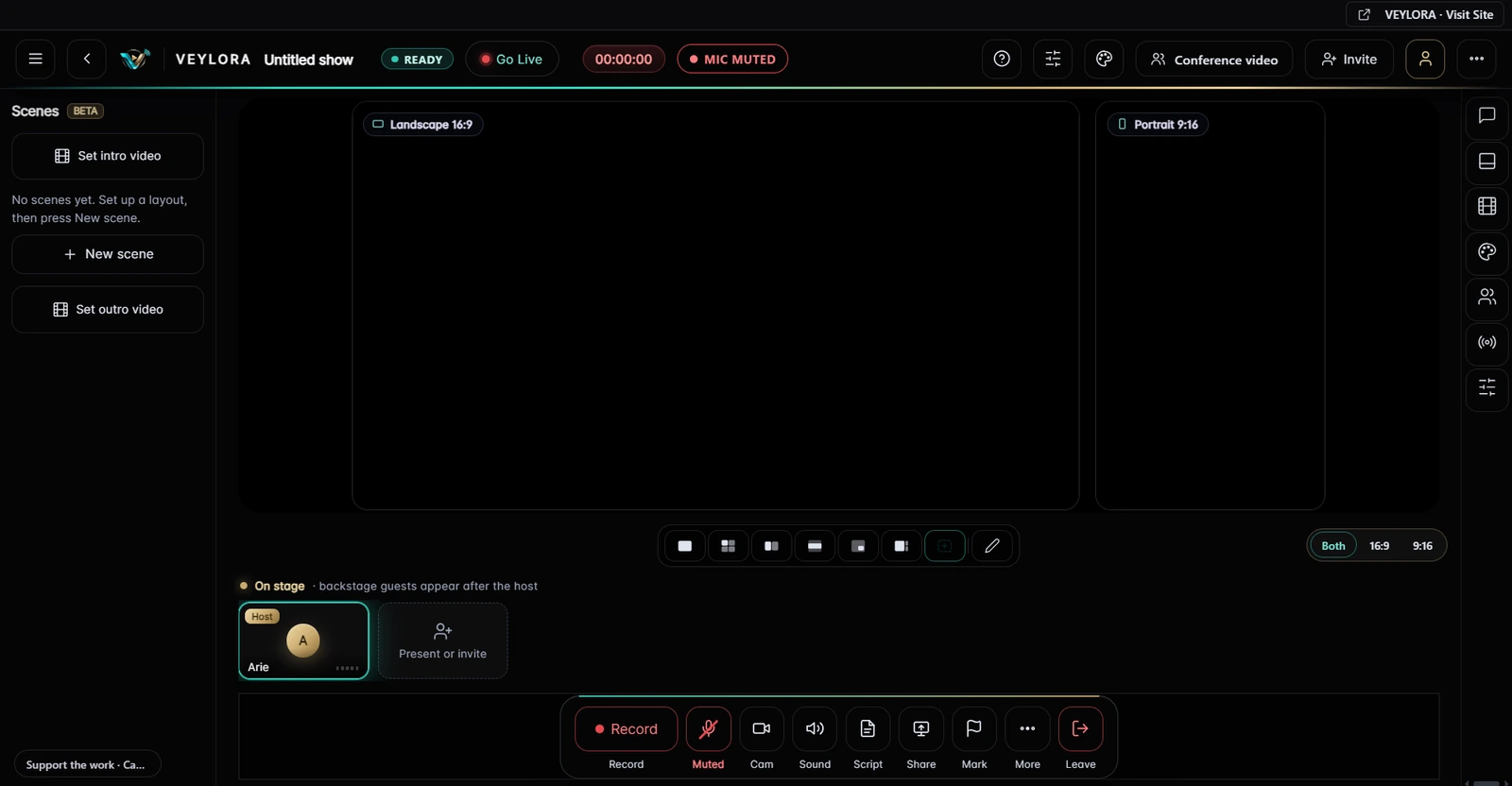
VEYLORA STUDIO is a professional live streaming and recording studio for Windows. Record your content, or stream live to YouTube, Facebook and other platforms.
Create a free account first so you get updates about your subscription. Sign up
In the Cash App "For" note, enter your VEYLORA Device ID (app > License). This is how your app is activated.
Bitcoin
bc1q7aevvrankrj3d77ywjvccnyam05v7agqmecu56
Create a free account first so you get updates about your subscription. Sign up
Send the plan amount, then contact us with your Device ID and transaction ID. You can also do this from the app (License screen).
VEYLORA STUDIO Plan Usage Policy
Last Updated: November 23, 2026
VEYLORA STUDIO services (offered via drshub.tech by Design Rivers Studios) are available under different subscription plans designed to meet the needs of distinct user types, creator workflows, and organizational capacities.
1. Individual & Solo Creator Plans
The Free, Starter, Creator, and Pro plans are licensed exclusively for personal use or individual creator work (such as solo streamers, independent podcasters, and freelancers managing their own broadcasts).
Free ($0/mo): Designed for casual or first-time individual users testing basic live streaming at no cost. Includes 1 destination, 720p resolution, Live Studio access, and the VEYLORA watermark (local recording is not included).
Starter ($4.99/mo): Designed for solo creators who want clean, watermark-free broadcasts and local backups. Includes 1 destination, 1080p resolution, Live Studio, and local recording.
Creator ($9.99/mo): Designed for growing individual creators expanding their reach and collaborating with guests. Includes up to 5 multistream destinations, 1080p resolution, up to 4 remote guests, local recording, and Brand Studio customization.
Pro ($19.99/mo): Designed for advanced solo creators, educators, and independent hosts running interactive events. Includes up to 10 multistream destinations, up to 10 remote guests, Webinars, AI Clips, Local Server access, Brand Studio, and local recording.
2. Multi-User, Team & Commercial Plans
Organizations, agencies, companies, and multi-operator teams using VEYLORA STUDIO in a commercial or multi-seat capacity must subscribe to a Studio or Enterprise / Custom plan.
Studio ($39.99/mo): Built for professional production setups, small teams, and commercial creators requiring maximum quality and multi-user collaboration. Includes 4K live streaming and 4K local recording, unlimited destinations, up to 20 remote guests, Team Seats, Teleprompter, Video Editor, Webinars, AI Clips, Local Server, Brand Studio, and Priority Support.
Enterprise / Custom (Custom Pricing): Built for larger organizations, networks, and businesses requiring high-volume team seats, custom features, onboarding, and Service Level Agreements (SLAs).
3. Account & Single-Device Licensing Rules
To protect account security and ensure fair usage across all tiers:
One Account = One Active Device: Each VEYLORA STUDIO account may only be signed in and actively running on one (1) Windows device at a time. Signing into your account on a second device will prompt you to log out of the previous session before opening the studio.
No Account Sharing on Individual Tiers: Sharing login credentials across multiple team members or departments on Free, Starter, Creator, or Pro plans is prohibited. Multi-person workflows require Team Seats available on the Studio or Enterprise / Custom plans.
4. Plan Reclassification & Commercial Transitions
Users must select a subscription tier that accurately reflects their actual usage.
If Design Rivers Studios identifies an individual plan (Free, Starter, Creator, or Pro) being used for multi-user team operations, agency client management, or commercial organizational broadcasting, we reserve the right to transition the account to the appropriate Studio or Enterprise tier at the next monthly billing cycle, or suspend access until the proper plan is selected.
Accounts subject to commercial reclassification will be notified via the email address registered to their drshub.tech account prior to their next renewal date.
5. Billing, Renewals & Custom Payments
All standard paid plans are billed monthly and can be upgraded, renewed, or canceled at any time through your drshub.tech account.
Subscriptions activated via alternative payment methods (such as Cash App or Bitcoin) are bound by this same Plan Usage Policy upon device license activation.
For complete, up-to-date details on plan features and pricing, please visit drshub.tech/veylora.
Windows 10 and 11Released November 24, 202696.4 MB
What is new VEYLORA STUDIO 1.0.21
- License page: the YouTube icon now opens the VEYLORA STUDIO YouTube channel (youtube.com/@veylorastudiolive). Nothing else changed.
VEYLORA STUDIO 1.0.20
- License page: social icons (WhatsApp, YouTube, Facebook, Instagram, TikTok, LinkedIn, Discord, Telegram) right below the top bar, in the same black, transparent style. They open in your browser.
- Sign-up and purchase: after you create your account or buy a plan on drshub.tech, you are brought back to this License page and asked to sign in.
VEYLORA STUDIO 1.0.19
- License page: new "Plan Usage Policy" button in the top bar opens the Plan Usage Policy on the same sleek black page, with a button back to the license and sign-in page.
VEYLORA STUDIO 1.0.18
- Splash screen: sleek black background, with a clean white glow around the DRS logo.
- License page: the VEYLORA logo no longer has the blue background tile.
VEYLORA STUDIO 1.0.17
- License page redesigned: sleek black, white text, transparent buttons with light gold trims. The request-code and activation-key section was removed from it.
VEYLORA STUDIO 1.0.16
- Required updates: when the administrator makes a newer version mandatory, an older app shows an "Update required" card on the License page with a button to download and install it.
VEYLORA STUDIO 1.0.15
- Every user must sign in (or create a free account) before the studio opens, on Free and on every paid plan. Your plan loads from your account.
- "Create a free account" now opens drshub.tech/login.
- One account = one device: if you sign in while the account is signed in on another device, you are asked whether to log that device out. Agreeing logs it out of the studio.
- The License page shows the version of the app you have installed.
VEYLORA STUDIO 1.0.14
- Forgot your password? The sign-in card has a "Forgot password?" button that opens the reset page on drshub.tech; set a new password from the e-mail, then sign in on any device with the app installed.
- Accounts: create a free account on drshub.tech/my-account and sign in from the License / Account page. One account can use the app on ONE device at a time; signing in on another device signs the previous one out until it signs in again.
 VEYLORA STUDIO